Buy Now

Silhouette

The Industry Standard
for Roto & Paint

Silhouette 2026

Powered by Machine Learning

Silhouette

World’s Most Refined Rotoscoping

Silhouette

AI-Driven Tools and Effects

Everything you need to get started

Silhouette Essentials Training

Visual Effects & Compositing

The industryโ€™s leading rotoscoping and paint tool is packed with major compositing features. Silhouette delivers 400+ VFX nodes, including Boris FX Sapphire, Mocha Pro, and Particle Illusion.

Top artists have relied on Silhouette on Hollywoodโ€™s biggest titles for over fifteen years. The Academy and Emmy Award-winning toolkit created by visual effect artists recently made its mark on Deadpool & Wolverine, Rebel Moon, Barbie, Dune, and 3 Body Problem.

Why Silhouette?

Industry leading rotoscoping and paint tools
Auto paint for speed and reliability
Powerful tracking options
Node based compositing and image processing
Easy keying for green screens
Includes Sapphire, Mocha, Particle Illusion and Continuum effect tools
Warping and morphing tools
Work as a plugin in your favorite host or as a standalone application

Professional Tools For Professional Results

Click the nodes to see for yourself

Mask ML

Roto

Paint

Comp

Mask ML

Behind The Scenes

Trusted by the industryโ€™s best

Silhouette powers Fallout

Discover how Framestore used Silhouette to tackle complex roto and paint tasks on the smash-hit series based on the iconic video game.

Plug in to your favorite host

Work in your preferred OS

macOS

Windows

Linux

System requirements

Mac OS
OS Requirements
  • Monterey (12.0) and higher
Processor (CPU)
  • Apple silicon or Intel (Sandy Bridge or newer)
System Memory (RAM)
  • 16 GB +
Disk
  • High-speed disk array or NVMe SSD
Graphics Processor (GPU)
  • Apple silicon integrated GPUs are supported, as are AMD GPUs on most modern Intel CPU Macs.

  • Machine Learning Plugins (ML) require an Apple silicon integrated GPU with macOS Monterey (12.0) and above.

  • If an appropriate GPU is not available, ML plug-ins can run on the CPU with significantly degraded performance.

Monitor
  • 1920ร—1080 or higher
Network
  • Must have an enabled network adapter (wifi or ethernet)
Windows
OS Requirements
  • Windows 10 & 11
Processor (CPU)
  • Intel x64 (Sandy Bridge or newer)
System Memory (RAM)
  • 8 GB minimum, 16+ GB preferred
Disk
  • High-speed disk array or NVMe SSD
Graphics Processor (GPU)
  • Most modern graphics cards from NVIDIA and AMD are supported for GPU acceleration, but for best performance, we recommend workstation powered by NVIDIA RTX 6000 Ada Generation, or AMD Radeonโ„ข PRO Series.

  • Machine Learning (ML) Plugins plugins require an NVIDIA GPU with compute capability 6.0 or above (Pascal), or an AMD Radeonโ„ข PRO Series GPU.

  • If an appropriate GPU is not available, ML plug-ins can run on the CPU with significantly degraded performance.

Monitor
  • 1920ร—1080 or higher
Network
  • Must have an enabled network adapter (wifi or ethernet)
Linux
Operating System
  • Red Hat Enterprise Linux/Centos 7-9, a compatible Linux distribution such as Rocky Linux, or Ubuntu
Processor (CPU)
  • Intel x64 (Sandy Bridge or newer)
System Memory (RAM)
  • 16 GB +
Disk
  • High-speed disk array or NVMe SSD
Graphics Processor (GPU)
  • Most modern graphics cards from NVIDIA are supported for GPU acceleration, but for best performance, we recommend workstation powered by NVIDIA RTX 6000 Ada Generation.

  • Machine Learning (ML) Plugins plugins require an NVIDIA GPU with compute capability 6.0 or above (Pascal).

  • If an appropriate GPU is not available, ML plug-ins can run on the CPU with significantly degraded performance.

Monitor
  • 1920ร—1080 or higher
Network
  • Must have an enabled network adapter (wifi or ethernet)

New in 2026

  • Better AI-Assisted Matting

    Auto-magic results with updates to Face ML, Depth Map ML, Mask ML, Matte Assist ML, and Matte Refine ML.
  • New AI-Powered Tracking

    Automate 3D meshes with Head Track ML, multiple tracks with Object Tracker, and even get Point Track ML.
  • Do More in 3D

    Enhanced camera solves with the Refine Solve workflow, Unwrap/Rewrap nodes, and a Render Depth node.
  • Polished Cleanups & Beauty Work

    Quicker paint with the new Healing Brush, enhanced cloning (Clone, Drag, and Blur), and intuitive brush controls.
  • Stronger VFX Pipeline Integration

    Cryptomatte data multi-object output support on ML tools and more.
  • Faster Playback

    Predictive pre-fetching and batched rendering provide smoother playback, even on heavy ML jobs.
  • Streamlined Daily Workflows

    Advanced node search, heads-up display, Favorites node, revised naming system, and Safe Mode.
  • New Automation & AI Integration

    External control via new built-in RPC server, Python package manager, and directly controllable by AI assistants using MCP.

Faster AI Matting Pipelines

Dramatically reduce manual effort, iterate faster & achieve high-quality results with total control.

Updates to five ML tools save you time with scalable multi-object workflows that streamline downstream compositing tasks.

  • Face ML: Updated model with new Nose and Neck matte options, full-face matte option, and upgraded integration with ML matte & compositing tools.
  • Depth Map ML: An updated model delivers greater detail and improved temporal consistency.
  • Mask ML: New multi-object workflow with object list management, foreground/background refinement tools, and object-based Cryptomatte data output.
  • Matte Assist ML: Delivers seamless playback with intermediate frame caching, improved propagation performance across long shots, and multi-object Cryptomatte output.
  • Matte Refine ML: A new Video Matting model delivers improved temporal consistency along edges compared to earlier versions and preserves Cryptomatte data.

Automated AI Tracking

More reliable tracking with fewer fixes done by hand.

Silhouette 2026 adds even more AI-driven tracking options to speed up your workflows.

  • Head Track ML: Builds and tracks a full 3D head mesh with facial motion and expressions.
  • Object Tracker: Automatically detects objects in a scene and generates tracked layers as they appear.
  • Point Track ML: A robust tracker that follows points through occlusions and even when objects move off-screen.

Expanded 3D Scene Node

Conquer tasks in a true 3D-aware workflow.

Additions to Silhouetteโ€™s 3D Scene node, powered by Boris FX SynthEyes, make it easier to handle complex retouching and digital makeup without painstaking frame-by-frame adjustments.

  • Enhanced Camera Solves: Iterate faster without redoing full solves using the new Refine Solve tool and new Post-solve cleanup tools to reduce drift.
  • Unwrap/Rewrap Nodes: Native 3D โ†” 2D workflow for paint, roto, and beauty work.
  • Render Depth Node: Generate depth maps from Head Track ML meshes.

Paint More Easily

Quicker, higher-quality cleanup and beauty work.

Silhouetteโ€™s renowned painting system features new creative controls & workflow improvements.

  • Healing Brush: Enables seamless cleanup and retouching, and expanded color sampling allows picking from any input.
  • Improved Brush Controls: Support blend modes and pressure-sensitive brush size and opacity.
  • Enhanced Clone Workflow: Adds continuous mode and auto-grade reuse.
  • New Blur & Drag Modes: Choose area versus sample blurs.
  • Resize Paint: This resolution-independent workflow allows you to create strokes in a lower-resolution session and then accurately rebuild them on higher-res media.

Built for Modern VFX Pipelines

Stronger integrations give you more flexibility throughout the compositing process.

Cryptomatte and data pipeline enhancements include:

  • Cryptomatte Data Port: Also passes filtered Cryptomatte data as alpha through all nodes via the Obey Matte input, allowing objects and layers to be used directly as matte sources.
  • Cryptomatte Mixer Node: Combines multiple Cryptomatte streams into a single output for more streamlined selection and matting workflows.
  • ML/AI Tools: Support multi-object outputs alongside improved viewer-based selection tools, making complex scene isolation and matte management faster and more resource-efficient.

Improved Performance & Playback

Faster responsiveness and a smoother overall experience.

  • ML Node Caching: Mask ML, Matte Assist ML, Face ML, and Matte Refine ML benefit from intelligent caching for smoother interactive workflows.
  • Predictive Playback: Significantly improved playback performance across Sources and Sessions through predictive pre-fetching and batched render jobs.
  • Playback Controls: Greater optimization flexibility with adjustable job queue size, preload frames, and threading settings.

Work More Efficiently

Intuitive, easier to manage day-to-day production helps you work at your best.

  • Advanced Node Search: Supports category, intent, and datatype filtering.
  • Heads-Up Display: Interact faster with a new context-sensitive HUD.
  • Stay Organized: New Favorites node and an improved naming system.
  • Safe Mode: A more reliable troubleshooting workflow makes it easier to diagnose issues and maintain stability in demanding production environments.

New Automation & AI Integration

Built for expansion with complete external control via RPC and MCP.

  • JSON-RPC Server: Drive Silhouette remotely through its new built-in JSON-RPC server. Created to support demanding pipelines, external processes can execute Python code, run script files, and control the application via JSON-RPC.
  • MCP Server: Allows direct calls from AI assistants, which can inspect projects, build node trees, edit shapes and keyframes, and render frames on your behalf.
  • Python Package Manager: Manage third-party Python packages inside a managed directory in Silhouette, isolated from the system Python.

Sapphire, Mocha Pro & Particle Illusion Nodes

Award-winning creative effects & compositing tools.

Harness the power of Boris FX sister products right in Silhouette with newly updated versions:

  • Sapphire 2026: Adds S_FilmBurn for authentic analog film looks, Builder parameter linking, new lens flares, presets & more.
  • Mocha Pro 2026: Adds Matte Refine ML, Refine Solve, and a new Curve Editor.
  • Particle Illusion: Adds parameter linking, color mapping, and an updated emitter library.

* When Silhouette is used as a plugin, Sapphire and Particle Illusion are not available due to technical limitations associated with running a plugin inside another plugin.

Previous releases

Silhouette New for 2024 - June 2024

  • Matte Assist ML, Mask ML, EZ Mask, Optical Flow ML, Retime ML, Motion Blur ML, Flow Tracker.

Silhouette New for 2023 - April 2023

  • Primatte, Stability AI, UpRes ML, Denoiser ML, Regrain, Expressions.

Silhouette New for 2022 - June 2022

  • Sapphire, Mocha Pro, Particle Illusion and select Continuum BCC+ filters included; Inpaint, Power Mesh, Point control parameter tracking, Cryptomatte.

Silhouette New for 2021 - May 2021

  • Fully featured plugin release, Lens Correction node, Review & Approval Notes, improved shape editing and keyframe tools, Gstreamer media engine and more.

Silhouette New for 2020.5 - April 2020

  • Paint plug-in, Node Favorites, Hold Node, Onion Skin and Python 3 support.

Silhouette New for 2020 - September 2019

  • Magnetic splines, edge snapping, Paint detail separation workflow, group and part tracking.

Silhouette New for v7.5 โ€“ April 2019

  • GPU accelerated Mocha, high-resolution image optimization for Paint, compact slider user interface.

Silhouette New for v7.0 - Jun 2018

  • Sequence Editing, Planar Tracker enhanced to track textureless objects, roto and paint enhancements.

Silhouette New for v6.0 - Nov 2016

  • Node based GPU accelerated compositor with total of 136 different nodes--all stereo enabled.

Silhouette New for v5.2 - Jul 2014

  • Crop node, EXR 2 support, Automation Paint enhancements.

Silhouette New for v5.0 - Jan 2013

  • 2D->3D conversion tools, inverse kinematics for roto, shape-based warping and morphing, raster paint history and auto-paint features with match-move.

Silhouette New for v4.5 - Jan 2012

  • Added OpenColorIO color management.

Silhouette New for v4.1 - Feb 2011

  • Planar Tracker rewritten again to be more robust with less user interaction.

Silhouette New for v4.0 - Mar 2010

  • Added Power Matte semi-automatic matting system, rewrote planar tracker, open shapes, scripting, commandline rendering, dual-clone painting.

Silhouette New for v3.0 โ€“ Aug 2008

  • Added fully stereoscopic workflow, planar tracking, x-splines, comprehensive keyer.

Silhouette New for v2.0 - Jul 2005

  • Added raster paint, layers, match-move, stabilization.

Silhouette New for v1.0 - Feb 2005

  • Silhouette ships with b-splines, bezier splines and point tracking.

Professional Roto Tools

Create sophisticated masks using B-Spline, Bรฉzier, X-Spline, or Magnetic Freehand shapes. Easy-to-use tools such as variable per-point edge softening and magnetic reshaping assist in creating articulate animations in record time.

  • Specialized shape editing tools: Magnetic splines, point groups, weighted keyframes, brush-based reshape, split shapes, collapse, and distribute points
  • Integrated tracking: Point, planar, and Mocha planar tracking
  • IK (Inverse Kinematics): Animate limbs and all jointed creatures
  • Render mattes with realistic motion blur
  • Export to industry standard shape formats including Cryptomatte
  • Stereoscopic 3D workflow
  • Built for teams and collaboration with review/approval notes

Fast and Reliable AutoPaint

Silhouetteโ€™s 32-bit float raster-based paint and tracking system โ€” with its unique non-destructive AutoPaint recording system โ€” meets the demands of high-resolution, color-managed VFX pipelines.

  • Paint tools: Pressure-sensitive customizable brushes and presets, including Clone, Grain, Repair, Drag, and more.
  • Channels & detail separation: Paint on individual RGBA channels or work on separated detail and color views for advanced control.
  • Sophisticated cloning: Advanced offset and warping, onion skin, and display views enable a streamlined workflow for aligning, patching, and removing unwanted pixels.
  • Powerful tracking options: Native point, planar tracking, and Mocha options.
  • Warped surface paint workflow: Use the Mocha Pro and PowerMeshWarp nodes.

Node-Based Compositing

Silhouetteโ€™s core is a powerful gestural node-based effects tree that delivers film-grade results.

View or edit any combination of nodes to control every detail in your image with 400+ specialty nodes organized into Color, Composite, Diffusion, Filter, Film Lab, Image, Key, Light, Particle Illusion, Sapphire, Special Effects, Time, Tints, Transform, Warp, and OFX groups.

  • Tracking and spline data ports and node actions
  • OCIO v2 color-managed workflow
  • Customizable workspaces for dual monitor set-ups
  • Precision color grading with 4-way color wheels and presets
  • Proprietary matte generation
  • Edge tools to color correct or blur the composite’s edge
  • Matte manipulation using shrink, grow, blur, and wrap functions

Multi-Host Plugin

The full Silhouette interface can also be launched as a plugin from standard VFX applications: After Effects, Premiere Pro, Nuke, Fusion, Resolve, and Flame.

The Silhouette multi-host plugin is included with Silhouette standalone application licenses or can be purchased as a separate option.

Warping & Morphing

Get the highest level of artistic control and render quality on digital retouching, image deformations, and even talking animals.

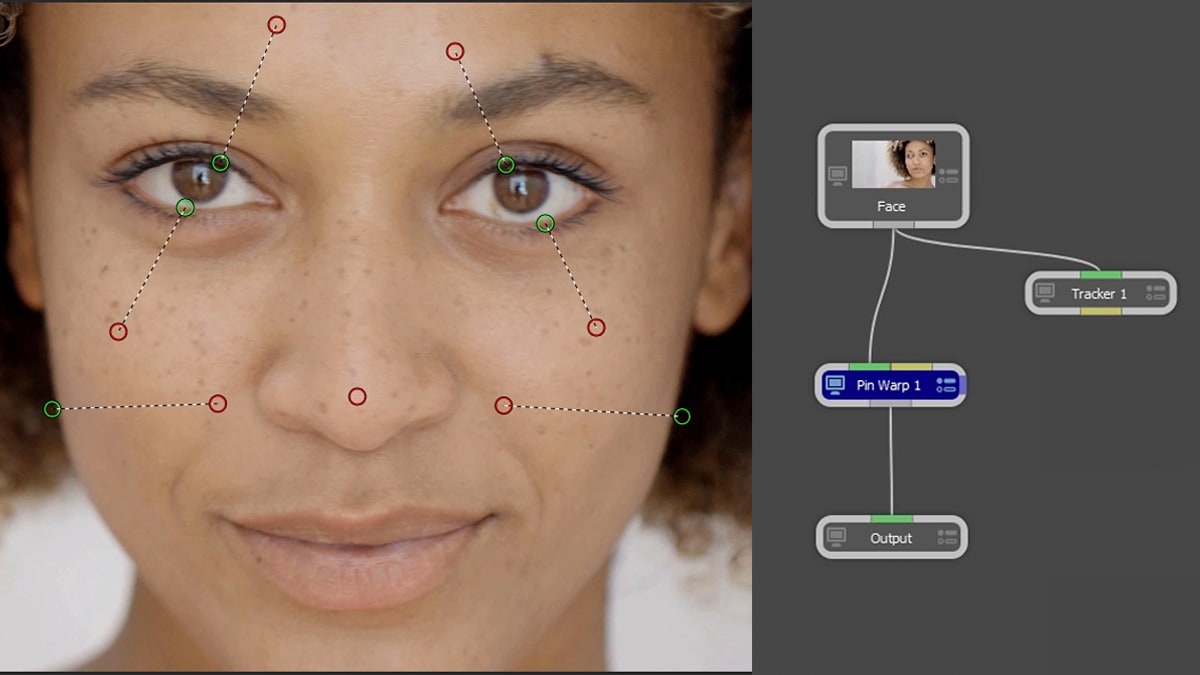
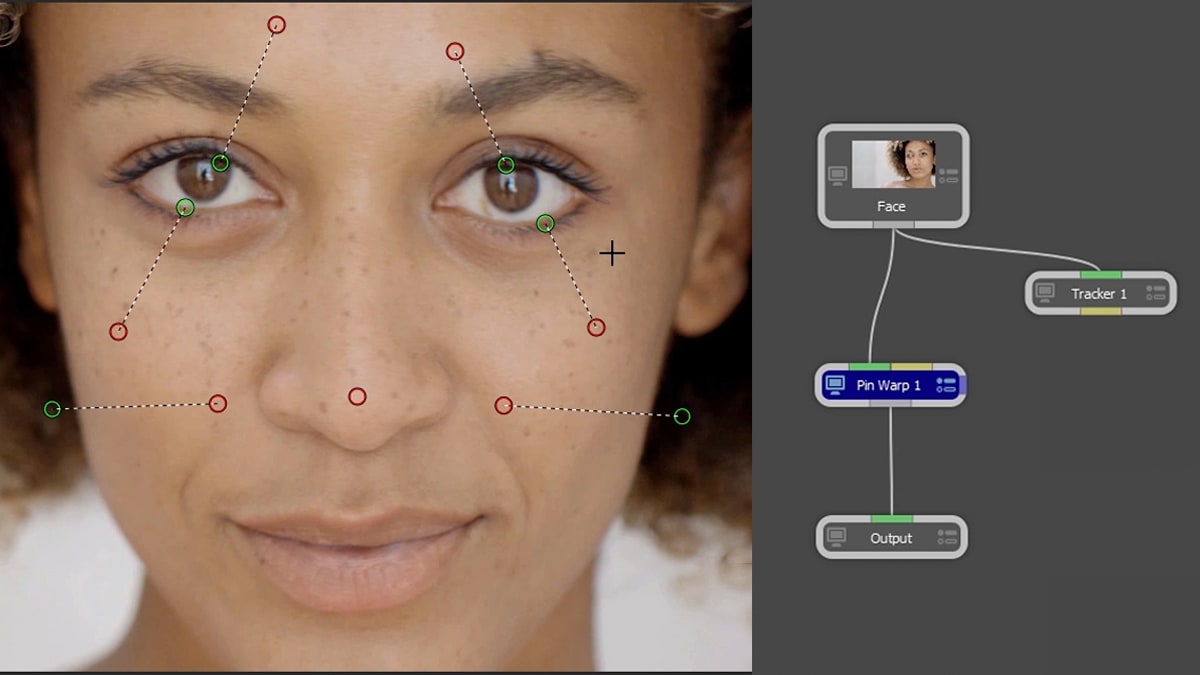
Shape or pin options: Create invisible touch-ups, subtle facial exaggerations, or dramatic transitions.

Music videos & effects shots: Unique shape-to-shape morphing transitions can be timed per layer with interactive previews for fast flexibility. Used in some of the worldโ€™s most famous music videos. Intro to Morphing Video

Beauty Work: Pin Warp allows user-defined image areas while leaving other areas untouched. Create a subtle nip and tuck or completely reposition an arm or leg. Watch Now

Keying & Matte Generation

Streamline your workflow.

Handle the most difficult keying and matte challenges โ€” including shots with fine hair detail, smoke, or reflections โ€” with proprietary matte extraction techniques.

  • Primatte: The keying industry standard uses a GPU-accelerated algorithm based on 3 multi-faceted polyhedrons which can be visualized using the 3D Preview display.
  • zMatte keying: Features multiple matte creation, light wrapping, edge correction, spill suppression, and matte manipulation. Watch Now
  • Power Matte: A unique interactive workflow enhances matte creation on normally non-keyable shots with foreground and background shape selectors that generate incredibly realistic and accurate results on semi-transparent objects. Watch Now

Powerful Tracking Tools

Access the industryโ€™s top tracking tools to speed up paint, roto, warp, and stabilization tasks.

  • Choose point tracking, native planar tracker, or the award-winning Mocha Pro node.
  • Create a seamless workflow between Mocha and Silhouette nodes with the surface tool, data ports, and node actions.
  • Pre-processing filters โ€” Blur, Sharpen, Contrast, Gamma, De-Noise, or Remove Flicker โ€” increase track accuracy on problematic images.
  • Apply post-processing filters to tracking data: Average, Smooth, Merge, and more.

Sapphire, Particle Illusion & Continuum

Create with compositing and effects plugins from Boris FX sister products.

  • Sapphire: Best-in-class effects include UltraGlow, UltraZap, Lens Flare, Shake, and more. Watch Now
  • Particle Illusion: Add 2D/3D animated simulations like snow, smoke, and fire with fluid dynamics.
  • Continuum: Select nodes include Atmospheric Glow, Magic Sharp, Beauty Studio, Light Leaks, Video Glitch, Film Glow, and many blur filters.


* When Silhouette is used as a plug-in, Sapphire and Particle Illusion are not available due to technical limitations associated with running a plug-in inside another plug-in.

Mocha Pro Node

Award-winning Mocha Pro planar tracking is included with Silhouette.

  • GPU-accelerated object removal
  • 3D tracking powered by SynthEyes
  • PowerMesh warped surface tracking
  • Insert compositing with AdjustTrack
  • Award-winning stereo 360/VR tools

Learn more about Mocha Pro

Compare Silhouette & Mocha Pro

Mocha Pro Plugin
Silhouette Plugin
Mocha Pro Application
Silhouette App
Standalone application for macOS/Win/Linux
Mocha Pro planar tracking interface
3D Tracking
Media Composer & VEGAS Pro Support
Premiere Pro Support
Node-based compositing with color correction and image processing filters
Advanced paint tools with AutoPaint and detail separation
Includes Mocha node for Silhouette
Includes Sapphire effect nodes for Silhouette
Includes Continuum and Particle Illusion nodes for Silhouette (mac & windows only)

Boris FX Silhouette combines advanced machine learning with industry-leading roto, paint, and compositing tools to help artists work faster and more precisely.

Built with ethically trained AI models and fully on-premise workflows, Silhouette gives professional VFX studios the power of machine learning while maintaining the privacy, security, and control required for high-end production pipelines.

From matte creation and cleanup to beauty work and object removal, Silhouetteโ€™s ML-powered tools automate repetitive tasks while keeping artists fully in control of the creative process.

ML Roto & Masking

Head Track ML

Automatically detect, track, and mask heads.

Dramatically simplify and accelerate the head tracking process by automatically generating accurate tracks with far less manual setup and cleanup.

By intelligently analyzing facial structure and head movement, Head Track ML delivers more reliable results on challenging shots with changing angles, hair movement, and partial occlusions.

Integrated ML masking and tracking tools help artists move quickly from footage to a clean 3D solve, making tasks like CG integration, face replacement, and compositing easier.

AI Object Detection

Enter a text prompt, segment, propagate, and render.
Rotoscoping just got easier! Automatically detect and mask objects in images based on simple text prompts โ€” like โ€œcar,โ€ โ€œperson,โ€ โ€œtreeโ€ or use more descriptive phrases.

AI Face Segmentation

Bring precision and flexibility to facial effects work.

The Face ML node automatically detects and segments key facial regions โ€” such as eyes, lips, mouth, nose, neck and surrounding skin โ€” into individual mattes.

This granular separation allows for targeted adjustments or creative effects to each feature independently, all accomplished without manual rotoscoping.

Matte Assist ML

Create animated mattes from a single frame.

The Matte Assist ML node offers artists unprecedented speed. Pipe Mask ML or Roto into the node and playback a fully animated matte.

Use it to create fast preview comps that donโ€™t need to be pixel-perfect.

Mask ML

Produce animated masks in one click.

The Mask ML node quickly creates alpha channel masks. Integrate Mask ML and Matte Assist ML to make precise animated mattes in seconds and automate repetitive visual effects tasks.

Itโ€™s the ultimate workflow for garbage masks and temp comps.

Optical Flow ML

Speed up tracking roto shapes & objects.

The Optical Flow ML node creates a velocity map of your shot that drives individual roto splines and tracks all points on a spline simultaneously.

Use your flow data with the Auto Keyframe tool to save valuable time and effort or generate realistic motion blur.

Matte Refine ML

Create natural edges from hard mattes.

Produces a natural edge from a hard matte providing fine detail with semi-transparency. Great for hair, feathers, fur, or any irregular edge.

Use Matte Assist ML to automatically create a hard, animated matte and then let Matte Refine ML do the rest.

ML Image Restoration

Frame Fixer ML

Replace damaged frames with newly generated ones.

Replace damaged frames with newly generated ones to solve issues like photo flash artifacts.

When Paint is connected to both the main and Data input ports, a morph occurs between the painted keyframes.

Denoise ML

Get rid of unwanted artifacts fast.

Denoise ML is a one-click solution that eliminates noise introduced by low-quality image sensors, low light, or lossy compression codecs.

The drag-and-drop tool analyzes your footage instantly, delivering high-quality results without losing vital details.

UpRes ML

Scale up your footage regardless of size.

UpRes ML is a premier tool that resizes any format with superior image results.

Match different archival sizes while sharpening and maintaining fine details. Selectively zoom to enhance specific clip areas.

ML Effects

Depth Map ML

Create detailed depth maps.

Depth Map ML analyzes an image and determines how far away each part of the scene is.

Use the depth map with other depth objects in the Depth node, control blur or color correct based on depth in the Depth of Field and Color Correct nodes, and create mattes according to a particular depth level.

Motion Blur ML

Generate realistic motion blur.
Motion Blur ML uses advanced optical flow technology to generate realistic, high-quality motion blur, delivering smoother movement and more natural-looking results.

Retime ML

Time warps reimagined.

Retime ML produces unrivaled quality time warps without the nasty artifacts and choppiness often associated with traditional time-based effect techniques.

Slowing down or speeding up shots has never been easierโ€ฆor as silky-smooth.

Take your compositing, rotoscoping and paint skills to the next level with Silhouette Essentials training broken up into a three part series with easy to follow lessons.

Over 17 hours of training videos to help you go from beginner to advanced

Watch them for free or follow along with exercise files for $95

Tutorials

Need help? Weโ€™ve got you!

Forum

A place for Silhouette users to discuss tips, tricks, product feature requests, and best practices.

Forum

Discord

Join our SynthEyes Discord to exchange tips, get quick help, and connect with fellow VFX artists.

Discord

Help Center

Search technical questions or open a ticket with our knowledgeable support team.

Support

Frequently asked questions

What is Silhouette?
What is the difference between Silhouette and Silhouette Plugin?
Are projects compatible between the Silhouette Standalone and Silhouette Plugin?
What is the difference between the integrated Mocha tracker and the Mocha Pro plug-in for Silhouette?
How do I disable 0 opacity roto shapes in the Viewer?
How do I reset the Silhouette preferences?
Can’t see your question listed above? Visit our Help Center

Not ready to purchase yet?ย 
Get started with Silhouette now

Need some hands on time with Silhouette before purchasing? No problem.
Simply download the Boris FX Hub and install Silhouette. After installation,
Silhouette will run a fully functional 14 day trial.

Please select your language

The website is currently localized into the following languages